What do I need to choose: Cryptic Disk or Disk Password Protection? What is the difference? What will better serve my needs?
Although both of the programs have substantially different working principles and provide different security degrees (from computer access restriction for children to protecting top secret information at a governmental level), many users still have questions as to what program is better to choose and if there is actually any difference between them since both of them seem to serve same purposes.
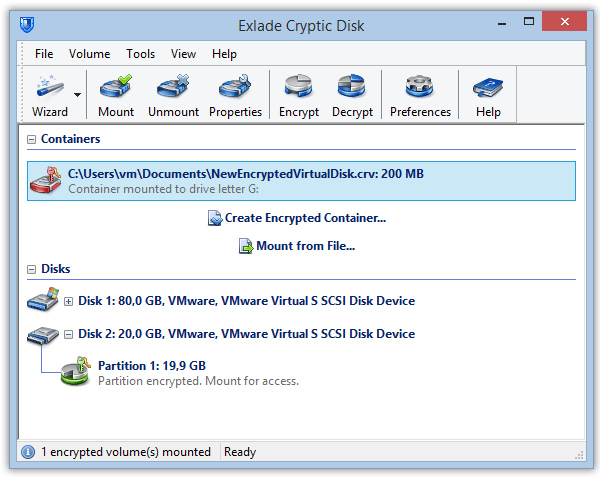
Generally, the major difference is that Cryptic Disk provides a data encryption solution, while Disk Password Protection deals more with access restriction tools. In other words, as compared to simple password protecting and hiding a certain disk or disk partition with Disk Password Protection, Cryptic Disk not only password protects it but also encrypts the entire contents of such a disk, obviously enabling protection of data at a higher and more secure level, especially against the cases of intended intrusion and data recovery attempts involving extracting a hard drive from the PC.
Apart from that, while Cryptic Disk fulfills its one primary function, that is encryption of a disk or disk partition, Disk Password Protection has several options, including computer boot password protection, disk partition protection and hard drive protection at a low level.
Computer boot protection with Disk Password Protection provides a password protection of the system boot; it prevents the operating system from booting, and does not deal with the data on the disk in contrast to Cryptic Disk that provides a comprehensive data encryption with a strong encryption algorithm.
At some point, disk partition encryption with Cryptic Disk could be confused with partition protection solution of Disk Password Protection since the partition protection option provides quite a secure way of hiding a partition so that no other program, application and the system itself can detect it or the data stored on it and work with these data. It cannot even be detected if the hard drive with the protected disk partition is placed into another computer. However, this protection does not involve encryption of any data like in Cryptic Disk, which, as mentioned above, provides a much higher degree of protection. With Cryptic Disk protection, even if the intruder finds out about a protected disk and gets access to it, they will not be able to make sense of any data on it, because they are encrypted.
Apart from that, both solutions behave differently when the user wants to work with the protected disk partition. In Cryptic Disk, once you have encrypted a disk partition, it will stay encrypted at all times even when you use it (the user only enters the password to connect and start working with the partition, without the need to decrypt it). In contrary, a disk partition protected with Disk Password Protection requires disabling the protection each time the user wants to work with it, which means that the partition is not protected when it is used.
Low-level protection with Disk Password Protection uses a hard drive’s technical specifics to enable or disable its embedded protection possibilities in the MS-DOS mode: the program forces the disk’s controller to block the entire disk with all the operating systems, partitions, etc., so no software can either read information from such a disk or boot it. As a result, the user will get a seemingly unformatted and unused disk working with which is impossible, because that is the information that the controller will be communicated to by Disk Password Protection. Low-level protection provides a complex protection solution including both boot protection and protection of all the partitions. The same purpose could be achieved with the help of encrypting a hard drive by Cryptic Disk with the difference that the disk will not appear useless and unformatted, but will contain useless data, since they are encrypted.
Below are the lists of situations for which each of the programs should be used.
In which cases I should use Disk Password Protection:
- to restrict access of other people to the computer. You can use boot protection to block computer booting in your absence:
- to make sure that you are the only person to use your computer at work or at home (or another person is, if you share the computer with them and you both possess the password), or when you go on vacation, or a manager is off from the office for some period of time and wants to ensure that nobody uses their computer.
- to prohibit access of children to the computer in the absence of parents and to ensure the children do their home work instead of playing computer games, or prevent them from spending too much time at the computer.
- to prevent system booting of an external hard drive in your absence at work, at home or at some other place.
- to hide a certain disk partition with classified information on it.
You can use partition protection to hide a disk partition from other people (colleagues, management, customers, or just friends and relatives), if there is multiple access to your computer at work or at home or there are chances that somebody else can use your computer or attend you during your activities on it, and you don’t want them to see or find out about the disk partition where you may keep some private documents, music, pictures, etc. The same is valid for any USB or flash devices – they will be invisible in the system.
- to enable a low-level protection of your hard drive if its motherboard supports this type of protection.
This is a complex boot protection and can be applied in the same cases as boot protection, but involves a comprehensive protection of all the partitions of the disk.
In which cases I should use Cryptic Disk:
- to protect data on the disk or disk partition from being used if the hard drive is stolen or illegally extracted from the computer – no one will be able to read anything from the encrypted disk or disk partition: no data will make any sense to the intruder regardless of the attempts made or technologies applied;
- to protect data on a removable device, such as a USB or external hard drive, from recovery if it is lost or stolen – again, the person who gets possession of such a drive will not be able to make any use of the data stored encrypted on it. This helps to secure against an undesired disclosure for the case when a person looses a USB device with extremely important or highly confidential information;
- to protect data from being viewed when a computer or a laptop is on repair implying that the data can be legally accessed by the maintenance personnel. All they will see is a senseless mix of bytes.
- to provide a high level of security for extremely important or secret and top secret information (business, commercial, governmental, financial, production information, etc.) stored on a disk or disk partition against whatever cases.
- to ensure secure disposal of a hard drive in case it turns useless/broken, so that no data could be retrieved from it under any circumstances or upon subjecting the disk to special data recovery techniques including both requiring special equipment and not.