Security and Encryption Solutions Development Company

Exlade Cryptic Disk 2

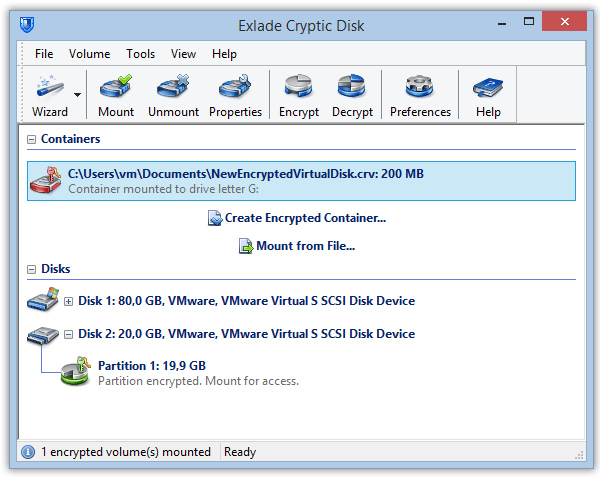
Cryptic Disk is designed for an easy and secure encryption of entire disks or their partitions. It ensures file security both on stationary hard disks and on any removable and portable storage devices (such as USB-drives, flash drives, laptop computers, etc.) through disk encryption and their password protection. In order to be accessed, the files saved on the encrypted disk require submitting a password created by the user. This allows preventing data stored on a disk from unauthorized recovery when, for example, someone found a lost USB device or got access to your PC hard drive.

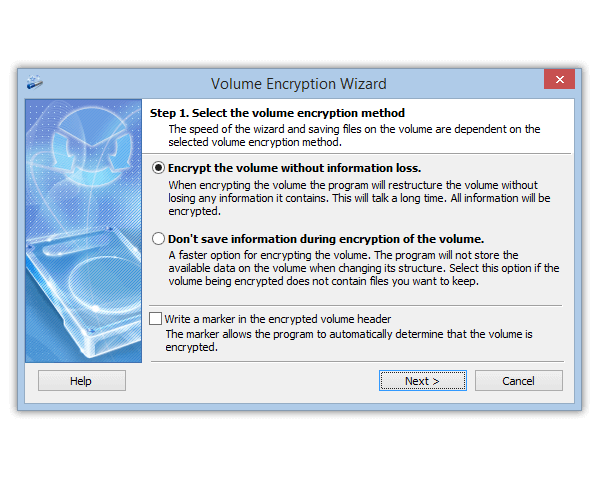
The convenience of the program lies in the principle of on-the-fly encryption, or user-transparent encryption, meaning the encryption process requires minimum efforts and participation of the user. For the files stored on a disk to be secured with Cryptic Disk, they should be temporarily copied to another directory from the to-be-encrypted disk and, after a fully-automatic disk encryption process, are copied back to the now encrypted disk, where they will be automatically encrypted.
On the whole, any files thereafter saved on to the encrypted disk will be automatically kept encrypted and secure.

From the user’s perspective, encrypted disks and disk partitions are not visible in the system upon operating system initiation unless the user activates them in the Cryptic Disk program (that can also be protected with a password for its launch restriction) and supplies a password to access them. The data being read or accessed with a password are automatically decrypted. At this point working with the files on an encrypted disk does not differ in any way from working on regular disks.

The program suggests a configurable multi-user access system for the user with administrator’s rights to set individual access rights for different users of the system, create passwords for them and establish various degrees of access privileges, including when it comes to accessing the system from the local network. These settings can also be saved and restored for further local network connections.

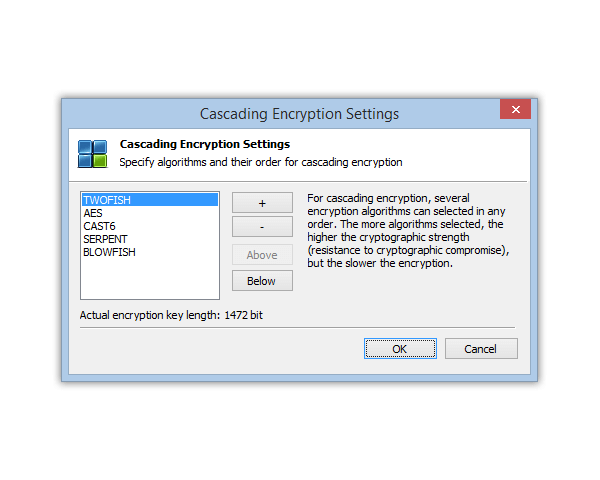
The program uses a strong and currently most reliable AES (Advanced Encryption Standard) 256 cryptographic algorithm approved by the US government and applied by NASA and the FBI to secure their data, suggesting it will ensure a truly reliable file security.

In case a user looses or forgets the password, the program provides for an optional export of the encryption key to a separate file. Do remember, however, that this key can be as well used by violators!

The product's general characteristics


  • Supports 64-bit versions and Microsoft Windows 7®.

  • Multi-language interface.

  • Disk encryption.
    A possibility to encrypt any kind of storage devices (hard drives, USB-disks, Flash drives, etc.

  • Disk partition encryption.
    A possibility to encrypt partitions (logical volumes) on hard drives.

  • Easy conversion to a regular disk.
    Encrypted disks and disk partitions can always be converted back to regular ones.

  • Automatic and user-transparent data encryption (“on-the-fly” disk encryption).

  • Strong and reliable cryptographic data encryption algorithms.
    AES with the key length of 256 bit and the CBC operation mode.

  • User-friendly interface.
    The program’s interface is designed taking into consideration all the usability requirements and is highly understandable and convenient even for an inexperienced PC user.

Performance


  • No installation required to run the program.

  • Quick connection.
    Cryptic Disk allows mounting encrypted disks and changing their properties immediately after their creation without any operating system restart or device reconnection needed.

  • Safe and correct disconnection.
    Upon the system shutdown, the Cryptic Disk process is the last to end, which enables other applications to finish work with files on encrypted disks correctly.

  • A reliable key generation system.
    The encryption key is generated subject to several dozens of constantly changing internal IDs of the operating system, MS Windows CryptoAPI, keystrokes on the keyboard and mouse movements. Also, in key generation reliable algorithms are used for pool transformation after every new value added. The pool is updated two times per second.

  • Plug-in system.
    The system of plug-in options for enhancing the basic functionalities of the program (for example, a plug-in option for running any scenarios on the encrypted disk after its connection or before disconnecting it).

Features


  • Emergency disconnection.
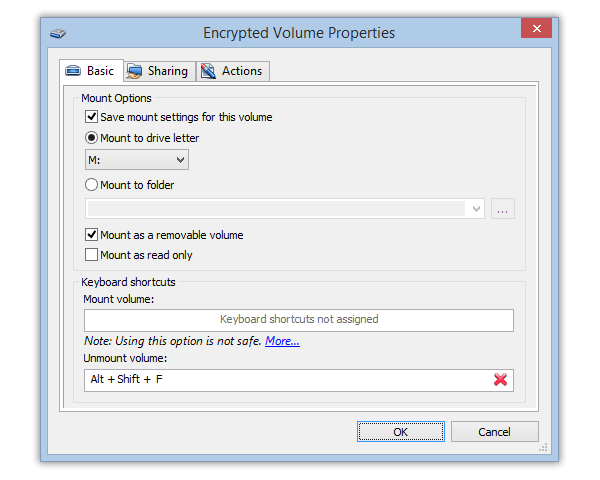
    Upon entering the hot keys combination (for example, “Ctrl+Alt+D”) all the connected encrypted disks will be disconnected.

  • Multi-access system.
    Multi-user access mode with restriction of access rights for encrypted disks.

  • Local network access to the encrypted disks.
    Access rights are set in the operating system only once to be saved for further connections.

  • Local network access settings saved.
    Upon the program restart this function ensures saving and restoring the list of shared resources of the encrypted disks.

  • Password protected Cryptic Disk launch.
    Password protection of launching the program itself.

  • Hot Key system.
    To ensure quick access to such functions as “disk mounting”, “disconnection of disks”, etc., hot keys can be set.

  • Automatic disk connection.
    A user can enter the access key to the encrypted disk and the program will make independent attempts to mount each disk to the system. This feature increases convenience of working with the program.

  • Automatic disk disconnection.
    Multi-function customized system of automatic disk disconnection in various user-unattended cases.

  • Command line.
    A possibility to use all the program functions in the command line, which enables automation of any features of the program.

  • Saving the encryption key to a file.
    In case a user looses the password, the program provides for an optional export of the encryption key to a separate file.


Russian