Security and Encryption Solutions Development Company

What is Disk Encryption

data safe

Disk encryption is a process of encrypting a disk applied for preventing the contained data from unauthorized recovery. For this purpose, special encryption software is used that allows any user to secure their confidential data through encrypting and password protecting the disk or disk partition containing such information. Any confidential and sensitive data, when stored on an encrypted disk or disk partition (including both hard drive and removable and portable storage devices, such as USB, flash-drives, etc.), are made unreadable and, thus, protected from being accessed or viewed by third persons without the decryption password. They will be accessible only when an authorized user enters the correct password.

Encryption itself is a process of converting original information (a plain-text) into an unreadable, indecipherable text (cipher-text) with the help of a certain algorithm. In order to use the encrypted information, one needs to initiate the reverse process of decryption that can only be performed with the correct password (which is set by the user upon encryption). Without this password, the encrypted information will not make any sense to the person trying to access it.

Why Disk Encryption

Disk encryption helps businesses, government structures and individuals protect their intellectual property security against breaches and undesirable exposure. As opposed to regular file encryption, disk encryption is considered to be more reliable and comprehensive means of data protection, since it provides for the cases when the user forgets to individually encrypt particular files or when their temporary files are created, encryption of which can be ensured by the disk encryption. If another person accesses the hard disk, with file encryption, such decrypted temporary files would compromise the protected files. Disk encryption means protecting an entire disk or a separate disk partition, so that no individual document or temporary file contained in that disk or disk partition is left decrypted. With Cryptic Disk this is possible if the Temporary Files folder is specially set to save temporary files to the encrypted disk.

Cryptic Disk Encryption Process

General Data Storage and Retrieval Process

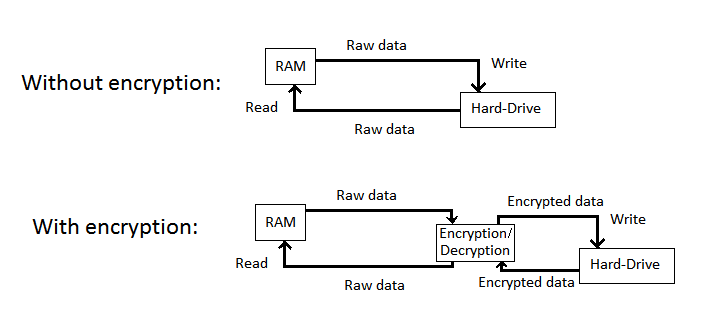
It is important to remember that there is a certain chain of processes initiated when the user requests to retrieve any file from or to save it to some disk partition. The chain is constituted from drivers that interact with each other and with a device (e.g. hard disk) to process the user’s request. In a simplified form, the chain looks as follows: user – File System driver – hard disk (disk driver). This is the path that any file or command is going to travel from the user to finally reach the hard disk and come back to the user with the results. File system provides organizing and storing files and data in a way to ensure their convenient and easy search and retrieval, arranging their physical location with some data storage device, placing files within certain sectors of disk partitions, etc. File System driver helps establish connection between the file system and the hard disk.

Thus, when the user wants to open some file in a certain directory, this request is first processed by the correct File System driver (FSD), then the FSD calls on the corresponding disk driver to extract the requested file. The same procedure is valid for other operations, such as saving, editing files on a disk, etc.

Same Process with Cryptic Disk

Now, what happens when Cryptic Disk is installed on the computer is actually the intervention of the Cryptic Disk driver into this chain affecting data storage and retrieval process: the Cryptic Disk driver interferes between the File System driver and the disk driver and intercepts there the user’s request to subject it to encryption or decryption procedure and to further transfer it to the disk driver with made changes. Thus, upon a regular text file (let’s say, an ABC-file) being saved onto the disk with the Cryptic Disk driver present in the system, the latter encrypts the file with an individually generated encryption key (see Creating an Encrypted Disk), i.e. converses it into an unreadable combination of symbols (now an XWZ-file), and transfers this combination as such to the disk driver. The disk driver then locates the encrypted and “messed-up” file on the disk without even knowing that something has been done to the original file and whether it is a regular file or encrypted one; it accepts the file as it is taking it for the original file.

This explains why removing the hard drive from the system or uninstalling Cryptic Disk from the PC does not influence the remanence of encryption. The thing is that the hard disk itself is not actually exposed to encryption; rather the data are, and they are always kept on that disk messed-up no matter which PC this disk is connected to. This means that if such hard drive is accessed by the system without a Cryptic Disk driver (e.g. a different computer), the disk driver and the File System driver will retrieve those messed-up data (XWZ-file) as they are (i.e. as they were saved onto the disk), because they skipped a decryption process they would undergo with the Cryptic Disk driver present in the system.

Creating an Encrypted Disk or Disk Partition

It is strongly recommendable that the user creates a backup copy of the data stored on the disk that they are going to use for encryption. Here is why. After the user provides a password for the disk partition selected for encryption, the program generates an encryption key (a Master key, also see Reliability of the Encryption Key), encrypts it with the above password and saves it at the beginning of the disk partition. The user needs next to connect the disk and is required to perform its formatting in order to be able to conduct any operations on it, meaning that any contained information will be destroyed.

Using the Encrypted Disk and On-the-fly Encryption

When the user needs to access and work with the encrypted disk, the Cryptic Disk program will request a password for the Cryptic Disk driver to decrypt the encryption key of the accessed disk. Once the correct password is provided, Cryptic Disk driver connects the disk to the system so that any the operations with the disk become available and are performed through the Cryptic Disk driver (according to the scheme of interfered data storage and retrieval process), meaning that any information traveling to and from the disk will be automatically encrypted and decrypted by the driver with the help of the encryption key. No other efforts on the part of the user are required to perform encryption - that is the specifics of on-the-fly encryption applied by Cryptic Disk.
The idea of on-the-fly encryption is that any files and documents contained on the encrypted volume become accessible once the correct password is provided by the user and can be operated as if they were regular files. It also means that when the encrypted disk is mounted to the system, the files saved onto it or opened from it are first subject to encryption/decryption, and the user does not participate in this process. That explains why files on the encrypted disk cannot be accessed (and, therefore, decrypted) without the correct password provided by the user. Disk encryption means protecting an entire disk or a separate disk partition, so that no individual document, file or folder name and their contents, even free space on that disk or disk partition is left decrypted and, thus, accessible without a password.

Encryption of Removable Storage Devices

The same process applies for a removable hard drive, with the only exception that a separate partition of around 10 Mb should be created on that disk in order to keep all the Cryptic Disk program files. Having those on the removable device will ensure its availability in cases when the user needs to connect it to other computers without Cryptic Disk installed on them.

As for USB devices, they have only one partition and, therefore, do not provide for the “traveler” option for Cryptic Disk. Only if the Cryptic Disk program is run on the PC can the encrypted USB storage device be used on a different computer.

What is the AES algorithm

One of the most reliable encryption algorithms approved by the U.S. government as the official encryption standard for protecting secret information of governmental organizations is AES (Advanced Encryption Standard) algorithm. The AES encryption algorithm (also referred to as Rijndael, named after its designers Joan Daemen and Vincent Rijmen) is publicly open and more transparent than the preceding one (Data Encryption Standard) and was selected as a standard on May 26, 2002 after a 5-year competition of several algorithm designs, with 192 and 256 key lengths evaluated and approved by National Security Agency (NSA) adequate for protecting top secret information of federal agencies.
As with any other cryptographic algorithm, it is not the algorithm that should be hidden but its encryption key, making the presence of a strong encryption key a must for ensuring true security (see Reliability of the Encryption key). The smaller the key is, the less secure and more vulnerable it is to attacks. AES-256 used by Cryptic Disk is an encryption algorithm with 14 transformation rounds (in the process of converting a plain-text into a cipher-text), a block size of 128 bits and the key length of 256 bits. That is why the implementation of AES-256 algorithm in software provides more than enough of protection.

Reliability of the Encryption Key

Besides the encryption algorithm, an encryption key is needed to safely encrypt any information. Encryption key determines the way the original text, or plain-text, is transformed into an encrypted cipher-text and inversely. Encryption key used by Cryptic Disk is symmetrical, meaning that it is applied both for encryption and decryption. The purpose of using an encryption key is to ensure the security of the encryption algorithm, since it is usually rather simple for an attacker to break the commonly applicable encryption algorithm due to its details being easily obtainable for them.

The secrecy of an encryption key can be ensured more easily than that of the encryption algorithm, which makes the security of the encryption key highly dependant on the security of the encryption key (or Master key).

First, the encryption key should be generated truly randomly. This is critical to the security of the encryption key. Various sources can be used to generate a random key, such as several dozens of constantly changing internal IDs of the operating system, MS Windows CryptoAPI, keystrokes on the keyboard, mouse movements and time variables, and counters. Also, in key generation reliable algorithms are used for pool transformation after every new value added. The pool is updated two times per second. When creating an encrypted disk and generating an encryption key for it, the user can be recommended to make additional mouse movements to provide a more random number generation source.

Second, after being generated, the Master key is supposed to be saved to the header of the disk. But since it is not secure to keep the encryption key on the disk as it is, it should also be encrypted. The password that the user supplies at the initial stage is used for encrypting the encryption key.

However, that is not yet it to the process. Given the AES-256 encryption algorithm (used by Cryptic Disk) requiring a fixed encryption key length of 256 bits, which is 32 bytes, the password to encrypt it should also be of that length. This can only be achieved by creating the so-called password’s cryptographic hash. That is a fixed-size bit value resulting from a variable-size amount of data after conversion with the help of a particular hash function, meaning that a password of any length (containing either 5 or 100 symbols, does not matter how many) and incompatible with the encryption key length can be converted into a 256-bit length value, called a password’s hash, now compatible with the encryption key.

This conversion can be implemented with the help of a SHA (Secure Hash Algorithm) hash function. Generally, these SHA hash functions were designed by the National Security Agency of the U.S. and the NIST announced them to be a U.S. Federal Information Processing Standard. SHA is now required by the U.S. law to be applied together with certain encryption algorithms in several governmental structures for the protection of highly confidential types of information. Cryptic Disk uses SHA-256 hash function family functions to produce 256-bit long hash values, which provides more security than actually needed.

After the password’s hash has been produced by Cryptic Disk driver, the password is deleted from its memory, the Master key is encrypted with the password’s hash and is saved to the header of the disk. Now the Master encryption key is provided with a proper security.
Each time the user wants to use the encrypted disk, the following process takes place: the user enters the password, Cryptic Disk driver converts the password into a 256-bit hash while deleting the password from the memory, then it loads the header with the encryption key from the disk and attempts to decrypt the Master key with the password’s hash. The Master encryption key is always kept in the driver’s memory using it for encrypting and decrypting of all the data loaded and saved and making the entire disk’s contents available in a readable form up till it its disconnection. When the user disconnects the disk, the Master key is deleted from the memory of the driver while remaining encrypted in the memory of the disk header (it was not decrypted in the memory of the disk header, but in the memory of the Cryptic Disk driver), however, with no reverse process taking place (the password cannot be restored from its hash – producing a password’s hash is an irreversible process).


Russian