Disk Encryption and Data Protection Software

Boot Protection

If the user wants to protect operating system booting and restrict access to the whole computer system, Boot protection with Disk Password Protection will be the right solution. It is appropriate for the cases when simple access restriction with a password will be sufficient for preventing unauthorized persons from using your computer and files.

Computer system booting involves starting the operating system with the help of a system loader of the booting disk partition. Disk Password Protection can block the operating system from booting: with boot password protection enabled, the system loader will be prevented from being read from the disk unless the proper password is entered, so that when any person tries to turn on the computer, none of the operating systems will load and, therefore, they will not be able to work with any documents or applications on the computer.

Disk Password Protection Wizard

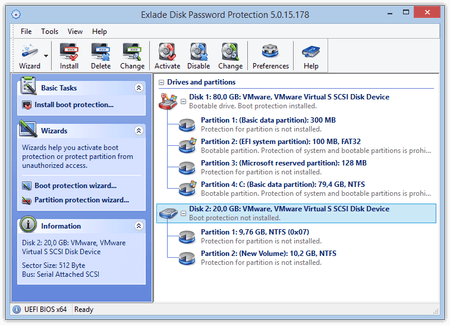
Using the program’s main window, a step-by-step wizard or a command line, the user first should select the disk they want to protect, which can either be a system disk or any removable storage devices, such USB or removable hard drives, and click Enable Protection. When the user creates a password, they are offered to provide a hint for a password as well; this is optional and is at their own discretion for the case if they occasionally forget the password when trying to disable the protection while running the Disk Password Protection program. However, the hint will not appear upon the start of the computer. The program also allows changing the password when necessary.

Disk Password Protection Boot Protection

After the protection has been enabled, when starting the computer again, the user will be requested to provide a password for the system to continue booting. And if no correct password is provided, the system will not boot. Any attempts to influence the booting process or withdraw the protection in some other way (i.e. disk formatting, uninstalling Disk Password Protection, etc.) will fail.


For safety reasons, the unregistered version of the program, after the expiry of 30 days, allows disabling the boot protection while the rest of the functions, such as enabling the protection or changing the password, become unavailable. The only possible password for protection will be “demo” with the appearing hint informing that a password of an unregistered program is installed. These restrictions will not be applicable once the program is registered.

Russian