Partition Protection
When securing some confidential information stored on a certain disk partition or a removable device is important, the option of Partition protection of Disk Password Protection will be useful. With such protection enabled, none of the protected disk partitions will visually appear in the system, be identified by any other program or be subject to any operations.

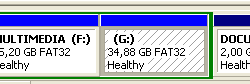
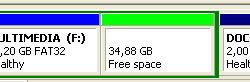
The Partition Protection solution in Disk Password Protection means hiding some disk partition with sensitive information as if there were no such partition on the computer whatsoever. The program implements this through deleting the record about the selected partition in the Partition Table of the hard drive. Normally, the system will show all the disk partitions with their information, such as the letter they are mounted to, space, type of file system, etc. With Partition protection, the system would not be able to detect the protected partition because after scanning the Partition Table of the hard drive it wouldn’t find any records about such partition and, therefore, would display it as a free disk space with no other information available. This disk partition has disappeared from the system, so no application, program or person can see/use it or the data contained in it.

Standard disk partition

Protected disk partition (G partition)
With the help of the program’s main window, a step-by-step wizard or a command line, the user can select the disk partition they want to protect, which can also be some removable storage device, such a USB or external hard drive (except for an operating system disk partition – in this case the OS will not start unless the protection is disabled on another computer), and click Enable Protection.

When the user creates a password, they are offered to provide a hint for a password as well; this is optional and is at their own discretion for the case if they occasionally forget the password when trying to disable the protection with the Disk Password Protection program. The program also allows changing the password when necessary. In order to work with the protected partition, the user needs to run the program, select this partition and disable Partition protection with the help of entering a correct password.

For safety reasons, the unregistered version of the program, after the expiry of 30 days, allows disabling the boot protection while the rest of the functions, such as enabling the protection or changing the password, become unavailable. The only possible password for protection will be “demo” with the appearing hint informing that a password of an unregistered program is installed. These restrictions will not be applicable once the program is registered.