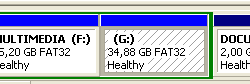
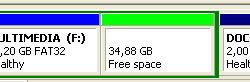
When hiding a certain disk partition or a removable device is important, the option of Partition protection of Disk Password Protection will be useful. With such protection enabled, none of the protected disk partitions will visually appear in the system, be identified by any other program or be subject to any operations.
Partition protection works with the Partition Table of the MBR of a disk. Any hard disk has a separate sector as small as 512 bytes containing the so-called MBR (Master Boot Record), responsible for keeping records of the partitions on the hard drive, booting and connecting the disk to the system. It is located not in some partition, but is in the first sector of a disk. Some part of this MBR contains a Partition Table with the information about the partitions of the hard drive, while the booting partition has a system loader in its first sector responsible for booting of a particular operating system.
When the Disk Password Protection program is run, it scans the Partition Table and displays all the detected disk partitions in the main window. The user chooses the partition they want to protect and creates a password. After this, the program finds the record about this partition in a Partition Table to make a copy of it, encrypt that copy and delete the original record from the Partition Table. In order to encrypt the copy of a partition record, Disk Password Protection uses the password’s hash. Since the AES-256 encryption algorithm used for encryption of the partition record requires an encryption key with the length of 256 bits, the password’s 256-bit value, or its hash, should be produced for it to be used for encryption.
Hash is a fixed-size bit value resulting from a variable-size amount of data after conversion with the help of a particular hash function, meaning that a password of any length (containing either 5 or 100 symbols, does not matter how many) and incompatible with the encryption key length can be converted into a 256-bit length value, called a password’s hash, now compatible with the encryption key.
This conversion can be implemented with the help of a SHA (Secure Hash Algorithm) hash function. Generally, these SHA hash functions were designed by the National Security Agency of the U.S. and the NIST announced them to be a U.S. Federal Information Processing Standard. SHA is now required by the U.S. law to be applied together with certain encryption algorithms in several governmental structures for the protection of highly confidential types of information. Disk Password Protection (and Cryptic Disk) uses SHA-256 hash family functions to produce 256-bit long hash values, which provides more security than actually needed.
After the copy of the partition record has been encrypted with the password’s hash, the encrypted copy is saved to special service sectors of the disk that are never used. Next the program encrypts some part of the disk partition (system areas of its File System) responsible for the structured storage of files including such information as their names, properties, location on the disk, etc., so as to complicate the recovery of files from the protected disk. The password’s hash is also saved to these system areas of the disk’s File System. Then the program requests the operating system to read the Partition Table to see that one of the partitions has disappeared from latter. If that partition was previously mounted to some letter, it will also visually disappear from the system. The result of enabled Partition protection option of Disk Password Protection is an invisible, undetectable and inaccessible disk partition.
When the user wants to disable the Partition protection, they select the protected partition in the Disk Password Protection program, enter the password for the program to compare its hash with the one saved to the system area of the protected partition File System. If such hashes coincide, the program reads the encrypted record about that partition from the system area, decrypts both the record and the system areas of the disk’s File System, and returns the record about the partition to the Partition Table. After being requested to read the updated Partition Table, the system detects a new partition in the Partition Table and mounts it to some letter, making it visible and accessible for the user.