German
Russian
EXLADE - Disk encryption. Data encryption. Boot protection. Security and Encryption Solutions Development Company
    English
Home Products Download Purchase Support Articles Partners Press room Contacts  
Products
Cryptic Disk
Disk Password Protection
DefenseWall HIPS
Handy Backup
Related Links
About the program
Getting started
Creating
Deleting
Mounting
Unmounting
Automounting
Multi-user access
Program Launch Protection
Program Settings
Command line support
Newsletter subscription

Cryptic Disk - About the program


Encryption

The program utilizes the cryptographic encryption AES 256-bit algorithm, which guarantees a high degree of resistance to hacking and a high speed for “on-the-fly” encryption. FIPS recommended that the US Federal Departments use the cryptographic algorithm AES (Rijndael, published in 1998) for cryptographic protection of classified information.

Encryption Keys and Passwords

When an encrypted disk/partition is created, the program generates a random byte sequence that will be used as the encryption key. The key length is 256 bytes. The generated key is encrypted by means of the specified password and saved in the heading of the encrypted disk. The key is used for encrypting/decrypting all saved/read data.
The program features the ability to export/import the encryption key. In other words, when the password to the encrypted disk/partition is lost, the password key can be imported from the file and a new password can be set. Remember that upon key restoration, the user database for this disk/partition will be lost.

Basic principles

The program consists of the encrypted disk management module and a driver.
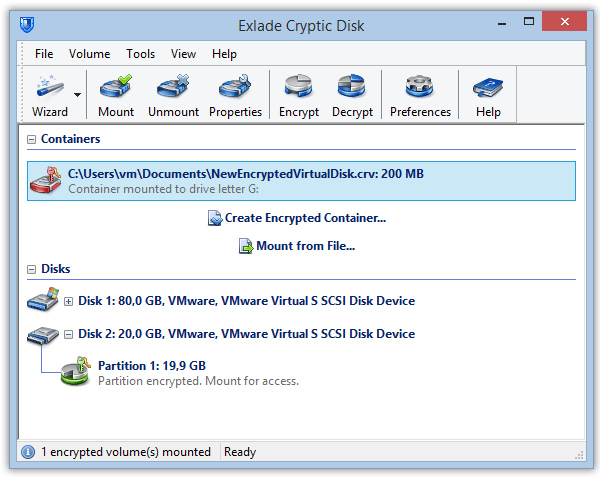
The work of the Cryptic Disk driver results in the creation of virtual logical disks. The most important functionality of the program is implemented in the driver: when information is being written to an encrypted disk/partition, the data is automatically encrypted. After that, it is stored in the encrypted form and is not available for others. Data is automatically decrypted when it is being read from an encrypted disk.
After you mount an encrypted disk/partition, you can work with it just as you would with a regular logical disk. For example, you can run programs stored on it, use it to store, create and open documents, databases, spreadsheets, etc. While a protected disk/partition is mounted, programs can access files stored on it in exactly the same manner as files stored on a regular disk. After a protected disk/partition is unmounted, access to files stored on it is closed. To mount a protected disk/partition onto the system and work with it, the user should enter the password.
Passwords are not stored in the system or on disks, they are used for encryption. It is impossible to decrypt information without the correct password. All possible attacks come down to guessing the password.

Password recommendations

You should choose a fairly strong password. It is not recommended that you use words as passwords because the password could be found with the help of a dictionary (and it doesn’t matter whether it is one word or a combination of several words). Do not use any dates, phone numbers, names as passwords.
A good password is a combination of uppercase and lowercase letters, digits and special characters, such as @ < & $ ) = + etc.
We recommend that you use a password not less than 20 characters long.
The maximum password length used in Cryptic Disk is 64 characters.


    Home  |  Products  |  Download  |  Purchase  |  Site map  |  Privacy Policy