German
Russian
EXLADE - Disk encryption. Data encryption. Boot protection. Security and Encryption Solutions Development Company
    English
Home Products Download Purchase Support Articles Partners Press room Contacts  
Products
Cryptic Disk
Disk Password Protection
DefenseWall HIPS
Handy Backup
Related Links
Download
Purchase
Screenshots
FAQ
Licensing
Version history
Documentation
Newsletter subscription

Frequently asked questions (FAQ)


Q. I want to protect my documents and mail from unauthorized access. How can Cryptic Disk help me?
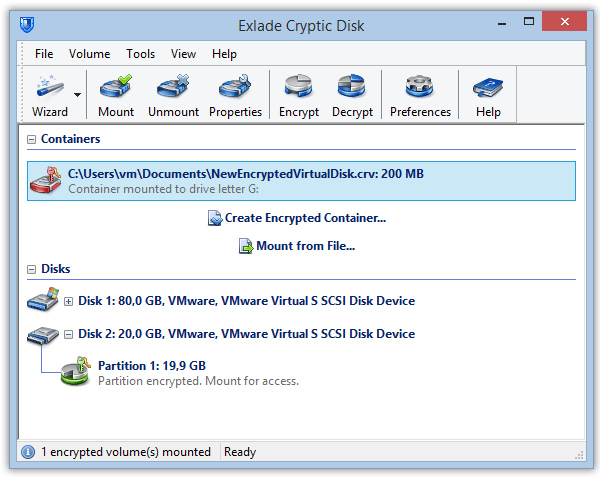
A. You can set aside any disk or its partition for storing confidential information, including secret documents and your mail database. Use Cryptic Disk to create an encrypted disk/partition out of that disk or partition, mount it and copy all the data you want to protect to it. A password will be required to access this disk/partition. You can enter the password only once after you start the system and use the encrypted disk/partition as any regular disk/partition until you shut down the computer. Or if you rarely use the protected information, you can mount/unmount it any number of times during your work.


Q. How strong is protection in Cryptic Disk? How can the password be broken?
A. The program uses the AES 256 encryption algorithm (with the 256-bit key length). Currently, there are no computers that could break the encryption key in a reasonable amount of time (it will take millions of years). A password, or more precisely its hash (SHA 256), is used to protect the encryption key. Neither the password nor its hash is stored anywhere. You enter it while mounting an encrypted disk/partition. If the password is not correct, it will be impossible to get the encryption key and consequently to decrypt information.
We recommend that you do not use short or simple passwords. Store them in safe places or, even better, memorize them.


Q. I forgot the password. Can I access the encrypted disk/partition without it?
A. The program can back up the encryption key. If you have a backup copy of this key, you can specify any new password for the disk/partition. Otherwise, it is impossible to recover the information.


Q. Is there a connection between the account name of the operating system and the username in Cryptic Disk?
A. No, there isn't. Usernames in Cryptic Disk are not connected with system account names.


Q. Do I have to enter the password only once after the system is started or each time I try to access the protected disk/partition?
A. After you start the system, access to all encrypted disks and partitions is forbidden. To get access, you should mount the disk/partition and enter the password. Until you unmount the disk/partition, you will be able to perform any operations available for a regular disk/partition. You can forbid access to the disk either manually (from Cryptic Disk, with a hotkey) or automatically.


Q. If perpetrators steal my encrypted disk and connect it to another computer, will they be able to access my information?
A. They will be able to do it only if they have your password or the encryption key.


Q. What disks does Cryptic Disk support?
A. Any storage devices supported by Windows 2000/XP/2003.


Q. What do I have to do to connect an encrypted disk to another computer?
A. All you have to do is to install Cryptic Disk on the computer you connected the encrypted disk to. You will need only your password to mount it.


Q. What should I do to be able to use my encrypted disk on various computers without downloading and installing the program on each of them?
A. You can split your hard disk into two partitions. Do not encrypt one of them (the smaller one, 10 MB will be quite enough), but copy the folder with Cryptic Disk to it. Encrypt the other partition. After you connect the hard disk to another computer, just run CrypticDisk.exe from the open partition and mount the encrypted disk to the system.


Q. Is it necessary to install the program on the computer to be able to work with encrypted disks?
A. No, the program does not require installation. You can run CrypticDisk.exe from a flash drive or from any other removable disk. Keep in mind that you will need administrator rights to start the programs without installing it.


Q. If I update Cryptic Disk to a new version, will I be able to use encrypted disks created in the old version?
A. Yes, you will. New versions of the program allow and will allow you to work with your encrypted disks.


Q. I want my disk to be always mounted to letter Z.
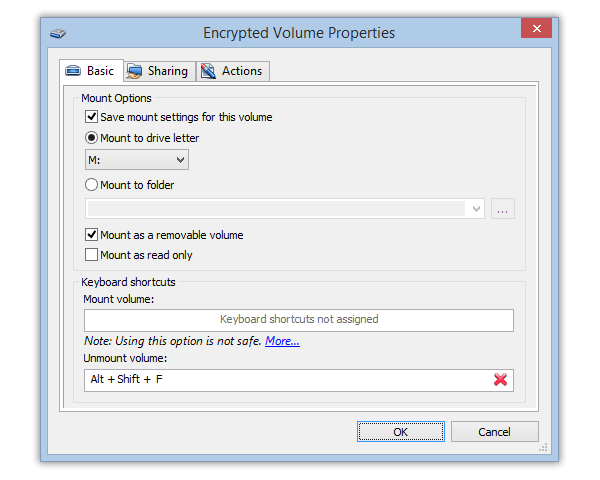
A. Open the settings dialog box of the encrypted disk and specify any free letter. The disk will be always mounted to this letter after that. If the specified letter is occupied, the program will mount the disk to the first free letter.


Q. I have two partitions. One partition is Ñ: where the operating system is installed and the other partition is D: encrypted with Cryptic Disk. Can I reinstall the operating system so that the encrypted disk is not damaged?
A. Yes, you can. You can reinstall the operating system on the partition C:, you can format it and the encrypted partition will not be damaged. After you reinstall the operating system, install Cryptic Disk and after that you can continue working with the encrypted partition.


Q. What is the maximum size of encrypted disks or partitions?
A. The maximum size of encrypted disks is 2^64 bytes (16,777,216 TB).


Q. I have an external disk with one partition. It is better to create an encrypted disk based on the entire hard disk or on one partition?
A. We recommend that you create encrypted disks based on separate partitions. Otherwise, it is possible that the operating system will damage the header of the encrypted disk.


Q. Can I allow someone to access encrypted disks only for reading data so that the person could not delete or damage it?
A. Yes, you can. You can add a new user in the user manager and give the user the corresponding rights.


    Home  |  Products  |  Download  |  Purchase  |  Site map  |  Privacy Policy