Products |
|
 |
|
Related Links |
|
 |
|
Newsletter subscription |
|
|
 |
|
|
Getting started
To launch the program in Windows, use the shortcuts created during the installation or the file diskpp.exe from the program folder. The file dppdos.exe is used to launch it in MS DOS.
Before launching Disk Password Protection, it is recommended to close all running applications.
The program starts its work from detecting all disks in the system. The splash screen is displayed during this process.
If the launch of the program is protected with a password, it will start detecting disks only after you enter the correct password.
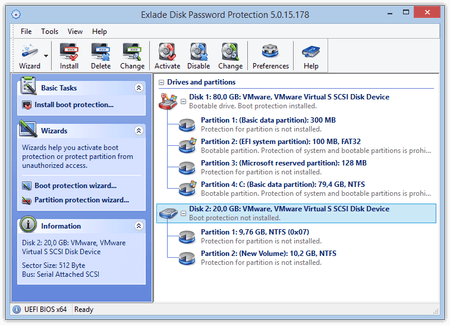
The main window of the program consists of two parts:
• the panel with disks and partitions;
• the panel for quick access to program functions (hereinafter, the right pane).
It is very easy to work with the program: you just select a disk or a partition and specify what you want to do with it (boot protection for disks and partition protection for partitions).
You can select your action in the right panel, on the toolbar or in the menu. There are three types of actions in the program: "Enable protection", "Change password" and "Disable protection". After you select an action, you will see a window where you can enter the password and the password hint (depending on the selected action). If the password is correct, the program will carry out the action and inform you about the result.
You can also control protection using the wizard. The wizard will lead you through all the steps (selecting the protection method, selecting the disk or partition, choosing the action and entering passwords and hints), then it will carry out all necessary actions and show you the result.
To complete enabling or disabling protection in Windows 98/98SE/Me, you will have to restart the computer.
|

|
|
|