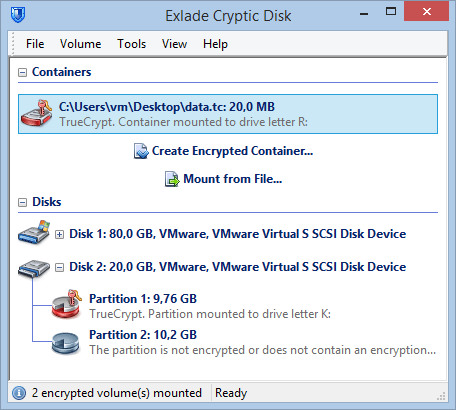
For about ten years TrueCrypt was the free tool for disk encryption, and many people still have TrueCrypt containers on old drives and USB sticks. Development stopped in 2014, but the name comes back whenever someone finds a .tc file and needs what’s inside.
- TrueCrypt is abandoned: the last full version is 7.1a (2012), development stopped in 2014.
- The encryption held up: the audits found no backdoors, but two driver flaws from 2015 stay unfixed.
- Old containers are as safe as their password. Don't run TrueCrypt on a current PC.
- To open old volumes: VeraCrypt 1.25.9 (not newer) or Cryptic Disk, then move the data into a new container.
What happened to TrueCrypt
TrueCrypt encrypted partitions, drives and container files (a file that mounts as a virtual drive) on Windows, macOS and Linux. The last full version, 7.1a, came out in February 2012.
On May 28, 2014, the website suddenly redirected to a SourceForge page warning that TrueCrypt “may contain unfixed security issues”. The anonymous developers released a decrypt-only 7.2, told Windows users to move to BitLocker and never explained why. The page still says to download TrueCrypt only to migrate data. No updates since.
What the audits found
The Open Crypto Audit Project crowdfunded an independent code review; later studies followed.
Is it safe to use TrueCrypt 7.1a in 2026?
Old containers on a shelf are as safe as the password you chose back then: no practical attack on TrueCrypt’s encryption has been published. Running TrueCrypt on a current PC is another matter.
Why not to run TrueCrypt today:
- Known holes stay open. While its driver is installed, a program or user with limited rights can use the public 2015 flaws to gain more rights.
- No updates since 2012. Windows 10 and 11 tightened the rules for kernel drivers. If an update or a security feature stops TrueCrypt's driver, nobody will fix it.
- No system encryption on modern PCs. Only the old BIOS boot mode; no UEFI, which Windows 11 requires.
- Risky downloads. The official page has only the decrypt-only 7.2. Copies of 7.1a come from third-party sites, and you must check yourself that nobody tampered with them.
Our advice: don't create new TrueCrypt volumes. Open the old ones once with a maintained program, copy the data into a new encrypted container and retire the TrueCrypt files. Choosing a tool for the future? See our comparison of encryption software for Windows.
How to open old TrueCrypt volumes today
Current VeraCrypt no longer opens TrueCrypt volumes. TrueCrypt Mode was removed in 1.26.7 (October 2023). According to the official release notes, you need 1.25.9 (February 2022). It is old too: use it for the migration, then update.
Converting in VeraCrypt 1.25.9: with TrueCrypt Mode checked, change the header key derivation algorithm to SHA-512. Changing only the password is not enough: TrueCrypt volumes often use RIPEMD-160, which current VeraCrypt no longer supports. This works for volumes from TrueCrypt 6.0 or later, not for an encrypted system partition. Then rename the container from .tc to .hc so newer versions recognize it, and check that it mounts in the current VeraCrypt before deleting anything. A hidden volume inside is converted separately, with its own password, and until both open in the current VeraCrypt keep a backup copy of the container. VeraCrypt too technical? Here is a VeraCrypt alternative for ordinary users.
Cryptic Disk limitation: many of its extra options work only with its own volume format, not with TrueCrypt volumes. One more reason to move the data into a new container. Details on the TrueCrypt support page.
Step by step: open a TrueCrypt container in Cryptic Disk and move the data
Mount the old container
Get it from the download page.
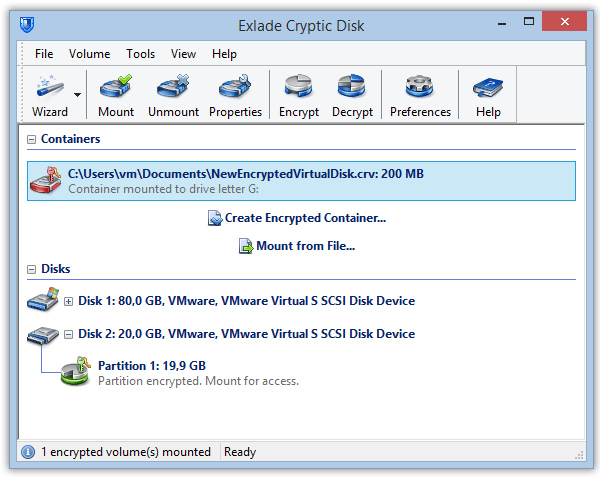
Select the TrueCrypt container in the main window. It often has the .tc extension, but the name doesn't matter.
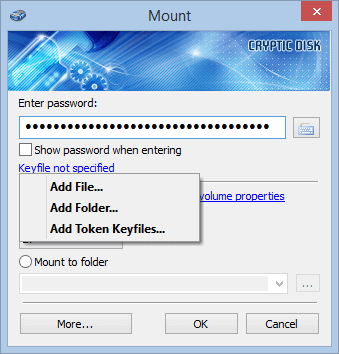
If you used key files with TrueCrypt, add them as well.
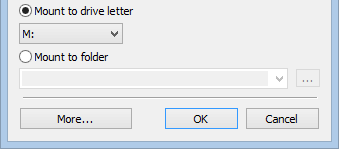
The container appears in File Explorer, and the main window labels it as TrueCrypt.
A TrueCrypt partition or external drive shows up in the disk list of the main window. Right-click it, start mounting and enter the password the same way.
Move the data into a new container
Choose where to save the file and its size: larger than the data, with room to grow. "Expandable file size" works only on NTFS drives.
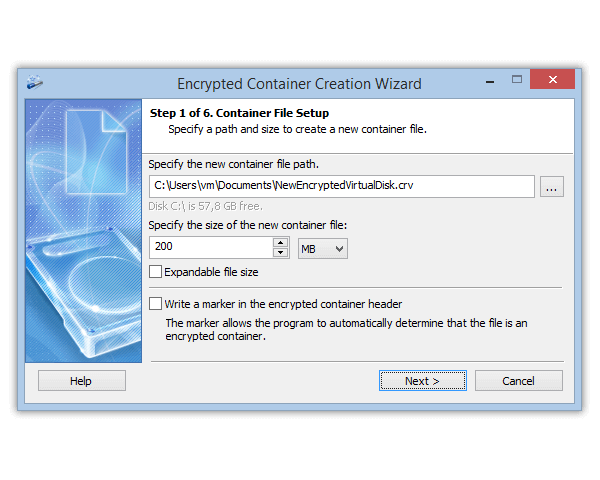
Choose a file system and keep the default encryption settings unless you have a reason to change them. Cryptic Disk derives the key deliberately slowly (1 to 10 seconds per attempt), which makes guessing much harder.
Finish the wizard, keep the header backup away from the container and mount the new container on another letter.
Copy all files to the new container, then open a few important ones from it.
Delete the old container only when you are sure everything was copied.
Every wizard page is explained in how to create an encrypted container.
A whole external drive encrypted with TrueCrypt? Copy the data to another encrypted location, unmount the drive, encrypt it with Cryptic Disk (with formatting) and copy the data back. See how to encrypt a drive.
What if Windows itself is encrypted with TrueCrypt?
The hardest case: VeraCrypt can’t convert a TrueCrypt system partition, and Cryptic Disk doesn’t encrypt system partitions at all. The official TrueCrypt page describes the way out:
- Make a full backup.
- Permanently decrypt the system drive in TrueCrypt itself.
- Protect it with a maintained tool such as BitLocker (Windows Pro, Enterprise, Education) or VeraCrypt, and keep personal files on an encrypted data partition or in a container.
Is there TrueCrypt for Android?
No, only Windows, macOS and Linux. Some third-party apps open TrueCrypt containers (for example EDS by sovworks), but the free EDS Lite is no longer developed (last release in 2021). We haven’t tested them and wouldn’t trust them with your only copy. Cryptic Disk doesn’t run on Android either: move the data on a Windows PC.
FAQ
Can I still download TrueCrypt?
Officially only 7.2, which can decrypt but not create volumes; 7.1a is only on third-party sites. To get your files out, you don’t need TrueCrypt: VeraCrypt 1.25.9 or Cryptic Disk will do.
Does the latest VeraCrypt open TrueCrypt containers?
No, TrueCrypt Mode was removed in 1.26.7. Use 1.25.9, or open the volume in Cryptic Disk.
Do I need TrueCrypt installed to open my old volumes in Cryptic Disk?
No. Cryptic Disk mounts them on its own and detects the format. You only need the password and, if you used them, the key files.
I forgot my TrueCrypt password. Can the data be recovered?
No. There is no back door, only guessing, and a long password takes too long to guess. More on whether encrypted files can be cracked.
Is TrueCrypt’s encryption broken?
No practical attack has been published, and the 2015 audits found no backdoors. The risk is the unmaintained program: known driver flaws and no updates.
The 30-day trial has no limitations: check that your volumes open before you buy. Windows 11, 10, 8.1, 8, 7, Vista and XP.
Free Trial Pricing & Buy