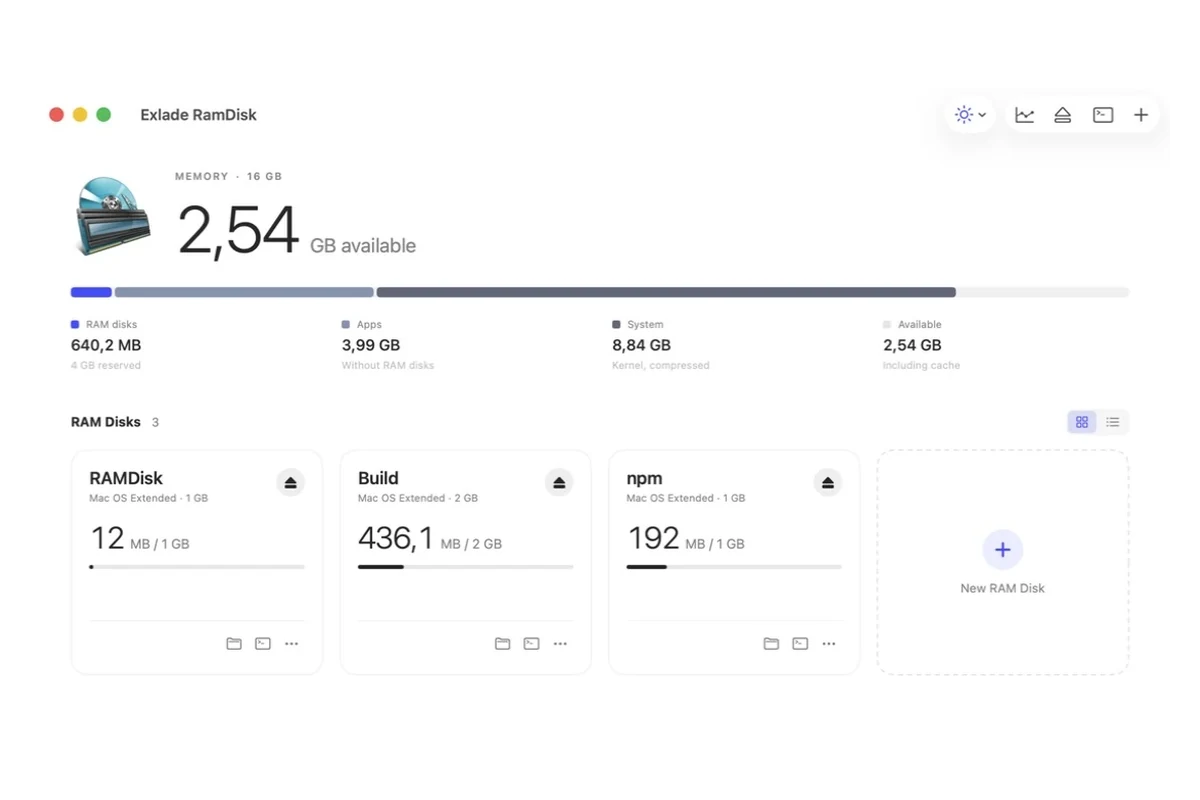
A build writes thousands of small files that nobody needs a day later: DerivedData, target, build, package caches. On a RAM disk this churn happens in memory, so builds and cache lookups get faster and the SSD is spared. Here is which folders are worth moving, the exact setting for each tool, and how to keep it working after a restart.
- Move: Xcode DerivedData, npm, pip, Cargo and Gradle caches, build output folders, TEMP.
- Never only in RAM: source code, repositories, archives, anything you haven't committed or saved.
- Keep between restarts: package caches yes, DerivedData and build folders optional.
- Size: 2 GB for one package cache, 8 GB for several caches or DerivedData.
What to move and what to leave alone
A RAM disk loses its files when it is ejected or the computer shuts down, unless the files are saved somewhere. So it suits folders that a tool can rebuild or download again.
- Xcode DerivedData: build products and indexes
- npm, Yarn, pip, Cargo, Gradle, Maven caches
- Build output:
target,build,obj - TEMP on Windows, TMPDIR on a Mac
- Source code and Git repositories
- Xcode Archives of the builds you shipped
- Tool settings and credentials:
~/.npmrc,gradle.properties - Anything that exists in one copy
The manual way, tool by tool
First create a RAM disk (on a Mac, on Windows), then point each tool at a folder on it. All settings below are from the tools’ own documentation.
| Tool | Default folder | How to move it |
|---|---|---|
| Xcode DerivedData | ~/Library/Developer/Xcode/DerivedData | Xcode > Settings > Locations > Derived Data: Custom. In scripts: xcodebuild -derivedDataPath <path> |
| npm cache | ~/.npm, Windows: %LocalAppData%\npm-cache | npm config set cache <path> |
| pip cache | ~/.cache/pip, Mac: ~/Library/Caches/pip, Windows: %LocalAppData%\pip\Cache | PIP_CACHE_DIR=<path> or --cache-dir |
| Cargo build output | target in each project | CARGO_TARGET_DIR=<path> or build.target-dir in .cargo/config.toml |
| Gradle | ~/.gradle | GRADLE_USER_HOME=<path> |
On macOS or Linux it looks like this (the disk here is mounted at /Volumes/RAMDisk):
npm config set cache /Volumes/RAMDisk/npm
export PIP_CACHE_DIR=/Volumes/RAMDisk/pip
export CARGO_TARGET_DIR=/Volumes/RAMDisk/cargo-target
Xcode, macOS only (restart Xcode afterwards):
defaults write com.apple.dt.Xcode IDECustomDerivedDataLocation /Volumes/RAMDisk/DerivedData
GRADLE_USER_HOME also moves gradle.properties, init scripts and Wrapper distributions, and CARGO_HOME holds installed tools and credentials. For those, move only the cache folders (~/.gradle/caches, ~/.cargo/registry) with a symbolic link (ln -s, on Windows mklink /J). And remember that after a restart the RAM disk is gone: every setting and link points to a missing folder until you create the disk again. With Exlade RamDisk: templates
Exlade RamDisk is a free RAM disk for Windows, macOS and Linux. Its templates do the steps above for you and undo them when the disk is ejected.
Developer (8 GB, Windows and Linux) moves the npm, Yarn, pip, Cargo, Gradle, Maven, Go and NuGet caches. npm (2 GB) is on all three systems, Xcode (8 GB, macOS) takes DerivedData. Folders of tools you don't have are skipped.
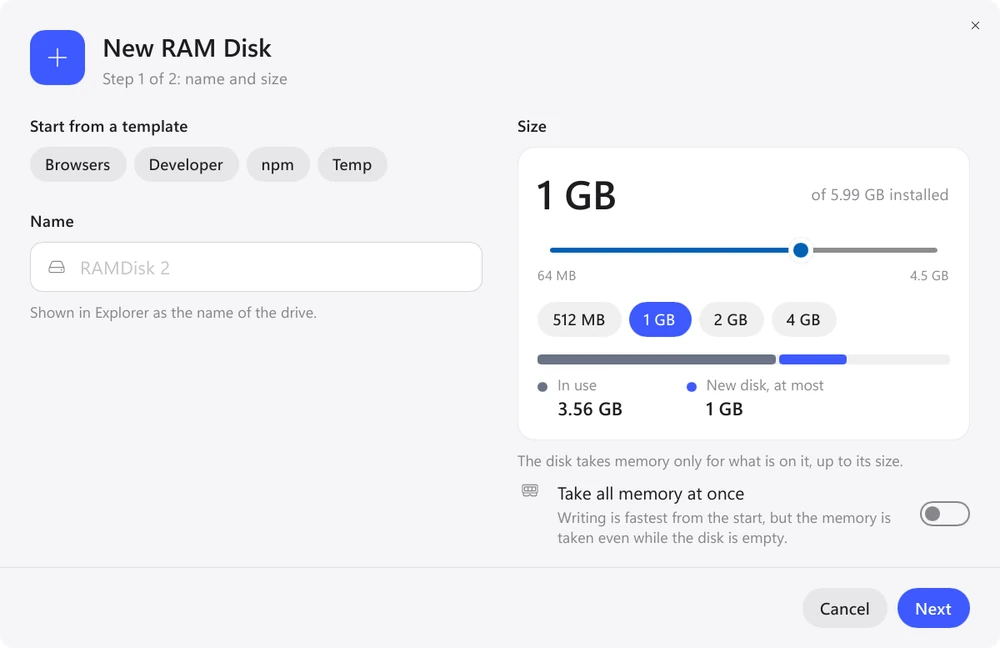
Under “Folders on this disk”, click “Add Folder…” and choose a project's target, build or obj. Turn on “Create when Windows starts” and, for package caches, “Keep files”.
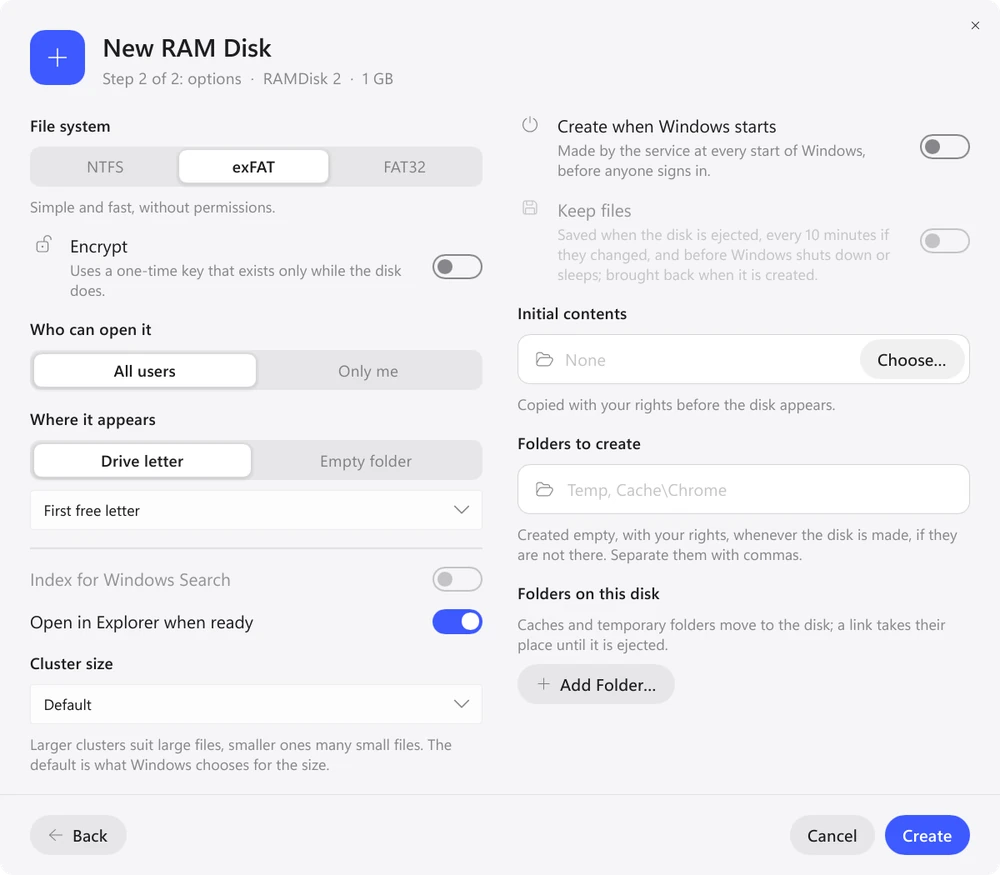
On Windows and Linux the folder is replaced by a link to the disk (on Windows a junction, no administrator rights needed), so tools see the usual paths. On a Mac the Xcode template changes Xcode's Derived Data location (restart Xcode), and the npm template sets cache in ~/.npmrc. When the disk is ejected, everything goes back.
Keep the files after a restart?
| Folder | Keep files? | Why |
|---|---|---|
| npm, pip, Cargo, Gradle caches | yes | otherwise packages are downloaded again after every restart |
| Xcode DerivedData | optional | it fills up again with the first build |
| Build folders | optional | the first build after a restart is a full one |
| TEMP, TMPDIR | no | temporary files by definition |
That is why the Developer template on Windows keeps its files and Xcode doesn’t. A startup disk with “Keep files” saves them on a schedule and before shutdown; after a sudden power loss only the changes since the last save are lost.
How much memory to give
Start with the template size. On Windows, Linux and macOS 26 a disk takes memory as files are written, not its full size at once. On macOS 15 the whole size is reserved as soon as the disk is created, so the 8 GB Xcode template holds 8 GB of RAM right away: there, pick a size your Mac can spare. You can resize a disk later: on a Mac and on Linux the files stay, on Windows only NTFS disks change size in place (that is why the Developer and npm templates use NTFS), and an exFAT or FAT32 disk has to be created again. After a day of work, “Usage History” shows the size each disk actually needed. On a computer with 8 GB of memory a RAM disk will soon take memory away from your IDE and compilers. Details: is a RAM disk worth it and Memory and History.
Build servers and CI
The eramdisk tool has the same commands on Windows, macOS and Linux, with JSON output for scripts. On a Linux server you can install just the service and the tool, without the GUI.
eramdisk create -t Developer                    # package caches (Windows, Linux)
eramdisk create -s 4G -n Build --startup        # disk created at every startup
eramdisk redirect add Build ~/src/app/target    # move a build folder to it
eramdisk list --json                            # disks and how much they use
FAQ
Will Xcode notice that DerivedData moved?
Yes, after a restart of Xcode: the Xcode template changes the same Derived Data location you would set in Xcode > Settings > Locations. When the disk is ejected, the previous setting comes back.
Can I keep source code on a RAM disk?
Better not. If the disk disappears before the files are saved, uncommitted work is lost. Keep code on the SSD and put only what can be rebuilt or downloaded on the RAM disk.
Windows 10 and 11, macOS 15 and later, Ubuntu, Debian and Fedora. No registration and no trial period.
Free Download Features