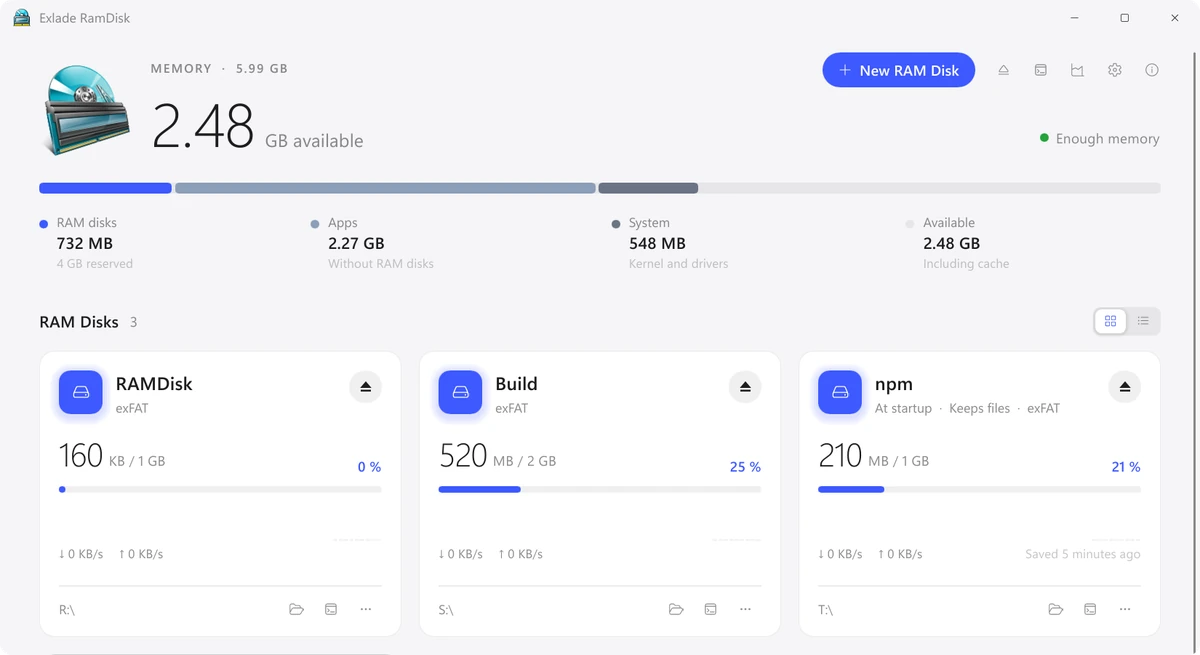
Windows 11 and 10 can’t create a RAM disk on their own: there is no such option in Disk Management or Settings, so you need a small program with a driver. Below are the steps in the free Exlade RamDisk, which file system to choose and what is worth moving to the disk.
- Built in: no RAM disk in Windows 10 and 11, you need a program.
- Steps: New RAM Disk, name and size, file system, drive letter, Create.
- File system: exFAT for TEMP and the browser cache, NTFS for package caches, build folders and disks you may resize, FAT32 only for old programs.
- After a restart: turn on “Create when Windows starts” and “Keep files”.
Does Windows have a built-in RAM disk?
Not the desktop editions. Disk Management in Windows 10 and 11 creates virtual disks (VHD and VHDX), but those are files on your SSD, not memory.
Windows Server can make a RAM disk with the iSCSI Target Server role: you create a virtual disk with a ramdisk: path in PowerShell and connect it through the iSCSI Initiator. It takes a dozen steps, and after a restart the disk has to be created again, empty.
On a regular PC you need a program. Exlade RamDisk is free for home and work, with no registration or key. It runs on Windows 10 1607 and later, Windows 11 and Windows Server 2016-2025 on x64, and for Windows 11 on ARM64. If you used ImDisk before, see our ImDisk alternatives.
Create a RAM disk step by step
Get the installer on the download page. It installs a driver and a service and asks for administrator rights once. After that you create disks without them.
Click “New RAM Disk”. The name is what Explorer shows for the drive. Pick a size with the slider or a button, or start from a template: Temp, Browsers, Developer or npm set the size and move the right folders for you.
The disk takes memory only for the files on it, up to its size: a 4 GB disk holding 300 MB takes 300 MB.
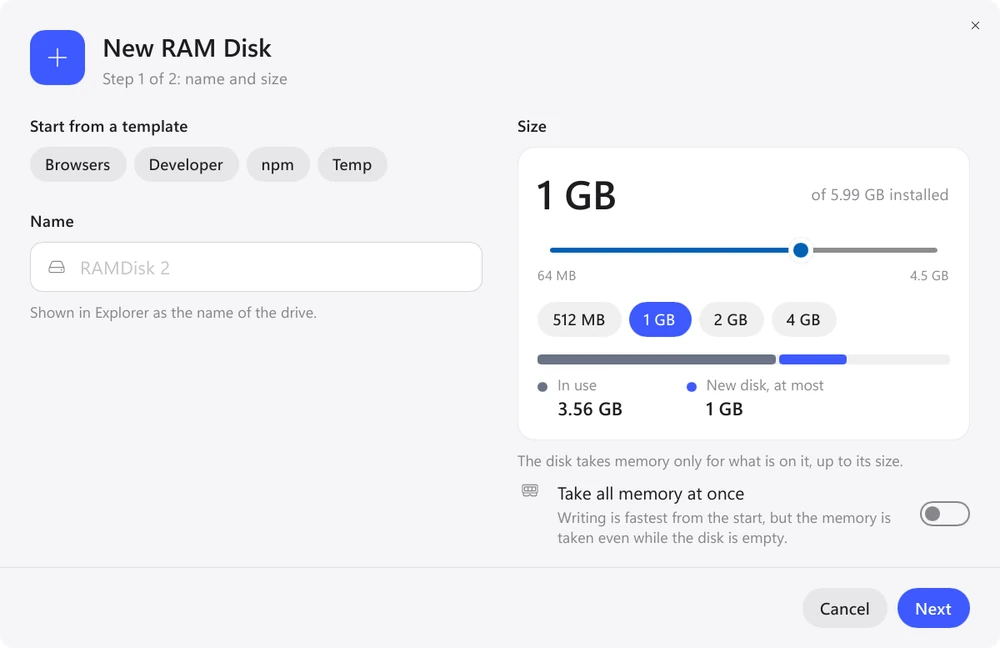
Click “Next”. Under “File system” choose NTFS, exFAT or FAT32 (see the table below). Under “Where it appears” keep “Drive letter” with “First free letter” or pick one, such as R:. “Empty folder” mounts the disk into an empty folder on an NTFS drive instead.
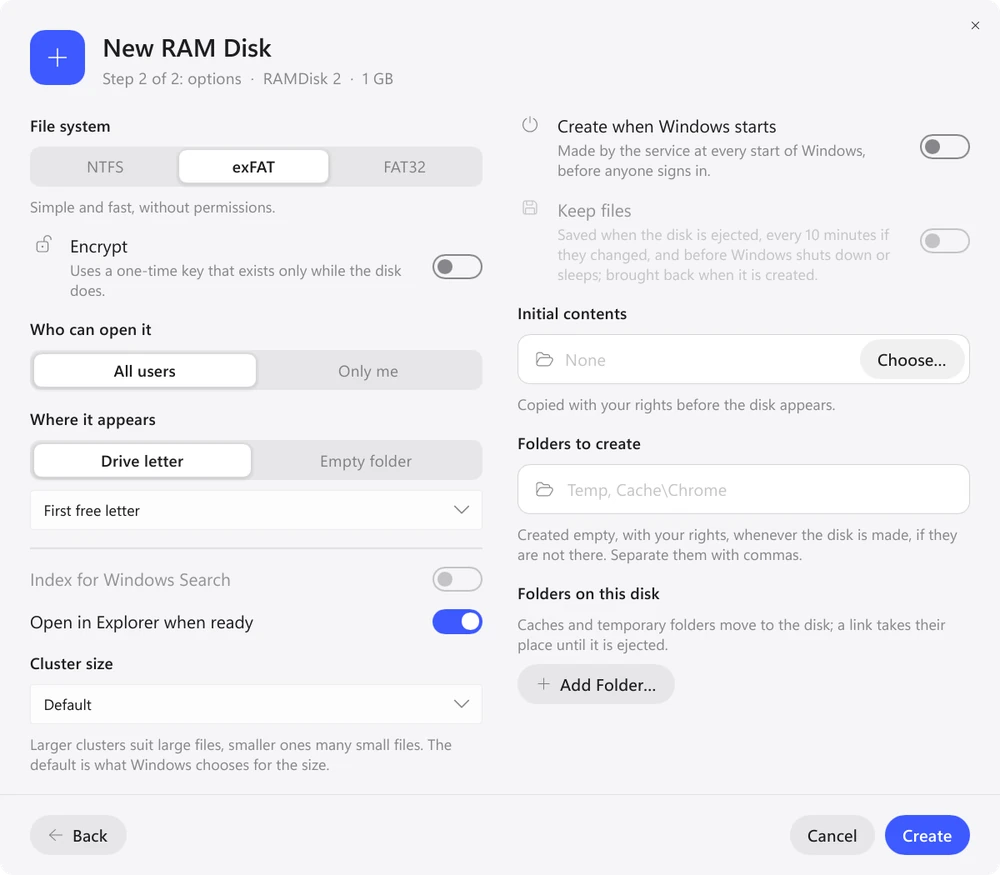
In the same window, turn on “Create when Windows starts”: the service creates the disk at every start of Windows, before anyone signs in. If you need the files after a restart, also turn on “Keep files”. They are saved when the disk is ejected, every 10 minutes by default (or 5 or 30, or off) if something changed, and before Windows shuts down or sleeps.
A regular disk can be made a startup disk later from its menu.
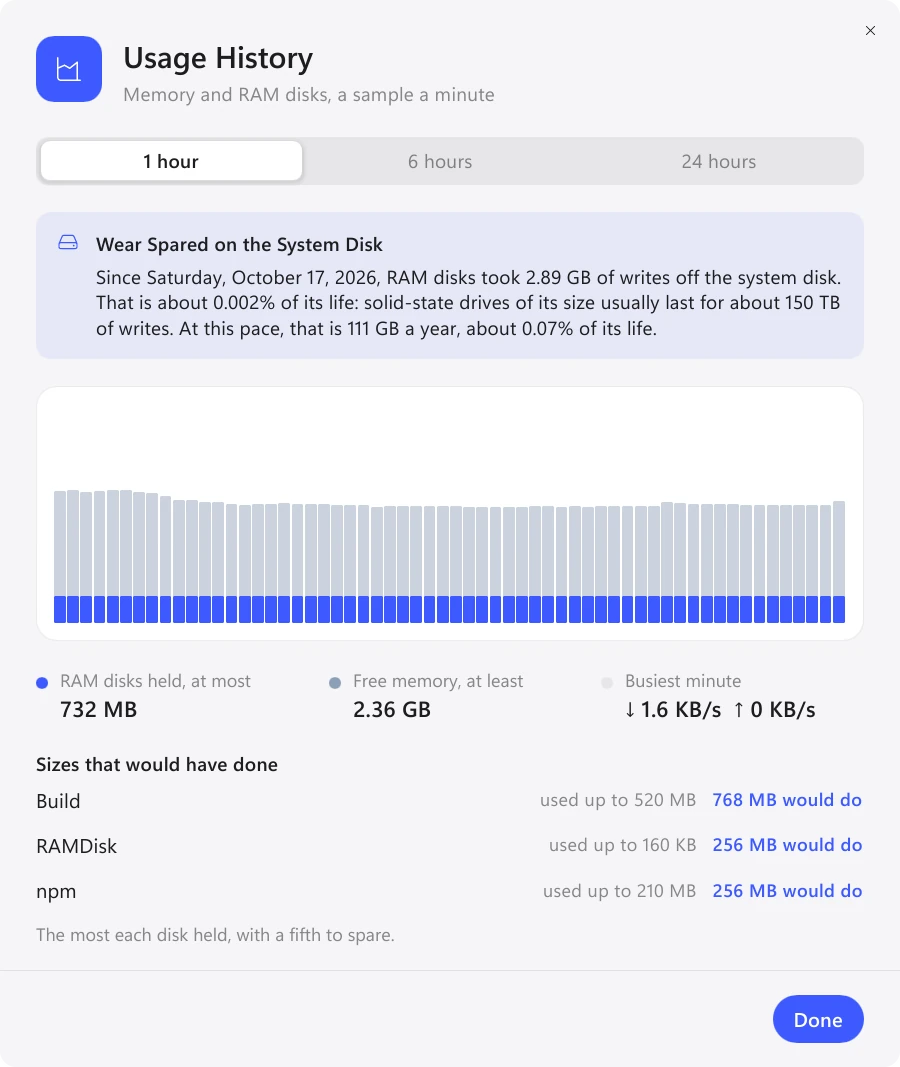
Click “Create”: the disk appears in Explorer under its letter. After a day of work, open “Usage History”. It shows how much memory each disk took and what size would have been enough. An NTFS disk can be resized at any time without losing files; an exFAT or FAT32 disk has to be created again.
NTFS, exFAT or FAT32?
| File system | Choose it for | Keep in mind |
|---|---|---|
| exFAT | TEMP, browser cache | simple, no file permissions; to change the size, create the disk again |
| NTFS | package caches and build folders (many small files), access rights, compression | the only one whose size changes in place; the most reliable |
| FAT32 | old programs only | files up to 4 GB, disks up to 32 GB |
The built-in templates choose for you: Temp and Browsers create exFAT disks, Developer and npm create NTFS disks, since NTFS handles many small files better. For your own disk, take NTFS if you might want to make it bigger later.
What to put on a RAM disk
When the disk is ejected or the computer shuts down, its files are gone unless the disk keeps them. So move what changes often and what you don’t mind losing.
- TEMP and TMP folders
- Chrome, Edge and Firefox cache
- npm, pip, Cargo and Gradle caches
- your project's build folder
- documents and photos
- anything you have only one copy of
A RAM disk takes memory away from programs. On a PC with 8 GB it soon gets in the way, and if Windows is already swapping, there is nothing to gain. More in is a RAM disk worth it.
FAQ
Does Windows 11 have a built-in RAM disk?
No. Windows 10 and 11 have no tool for a disk in memory. Windows Server can create one through the iSCSI Target Server role, but it has to be set up in PowerShell and is gone after a restart. On a desktop PC, use a program such as Exlade RamDisk.
How much memory should I give a RAM disk?
Start with the template size: 2 GB for TEMP, the browser or npm, 8 GB for developer caches. A disk takes memory only for the files written to it. After a day, “Usage History” shows the size that would have been enough.
Will my files survive a restart?
Only on a startup disk with “Keep files” turned on. After a sudden power loss, you lose only what changed since the last save.
Can a RAM disk appear as a folder instead of a drive letter?
Yes. Choose “Empty folder” under “Where it appears” and pick an empty folder on an NTFS drive.
Windows 10 and 11, macOS 15 and later, Ubuntu, Debian and Fedora. No registration and no trial period.
Free Download Features