A RAM disk is a drive that lives in memory: files on it are read and written at memory speed and never touch the SSD, and they vanish when the disk is gone. Whether that is worth giving up part of your RAM depends on what you put there and how much memory you have.
- Worth it: builds, package caches, TEMP and browser cache, that is, many small files rewritten all day.
- Not worth it: games, large media files, PCs with 8 GB of RAM, anything you can't afford to lose.
- Size: start with 2 GB, 8 GB for developer caches, and check after a day how much was really used.
- SSD: a RAM disk takes the churn of temporary files off the drive, which spares its write endurance.
When a RAM disk pays off and when it doesn’t
- Build folders, Xcode DerivedData, npm, pip, Cargo and Gradle caches
- TEMP folder and browser cache
- Fewer writes to an SSD you can't replace
- Scratch files that must disappear after work
- Games: dozens of gigabytes that are mostly read, not written
- Video, photo libraries, virtual machine images
- A computer with 8 GB of RAM that already runs short
- Documents and anything you have only one copy of
Why games and big files gain little: Windows already keeps recently read files in memory, in its file cache, and a game would have to be copied to the RAM disk every time and occupy that much memory. The real win is with writes: thousands of small files that a compiler, a package manager or a browser creates, rewrites and deletes all day.
How much RAM to give a RAM disk
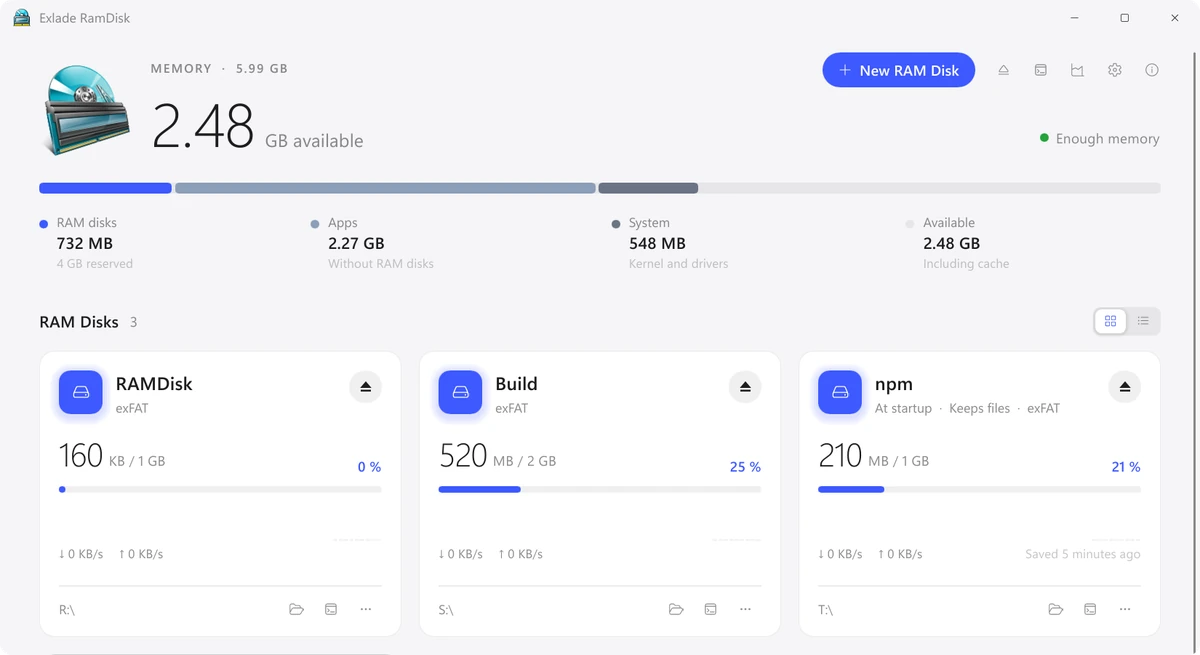
The disk size is a limit, not a reservation: memory is taken as files are written. The exception is macOS 15, where a disk reserves its full size right away, so size it more carefully there. In the screenshot at the top, three disks with 4 GB in total hold 732 MB. So the question is not how big the disk is, but how much your apps leave free on a normal working day.
| Installed RAM | RAM disks in total | What fits |
|---|---|---|
| 8 GB | usually none, at most 1-2 GB | TEMP or browser cache, only if memory stays free |
| 16 GB | 2-4 GB | the Temp, Browsers or npm template (2 GB each) |
| 32 GB | 4-10 GB | Developer or Xcode (8 GB) plus Temp |
| 64 GB | 10-16 GB or more | several disks: developer caches, browsers, TEMP, a build folder |
If memory runs out, apps get less of it and the system starts using the page file or swap, which writes to the SSD again. When the system is already swapping, a RAM disk gains nothing.
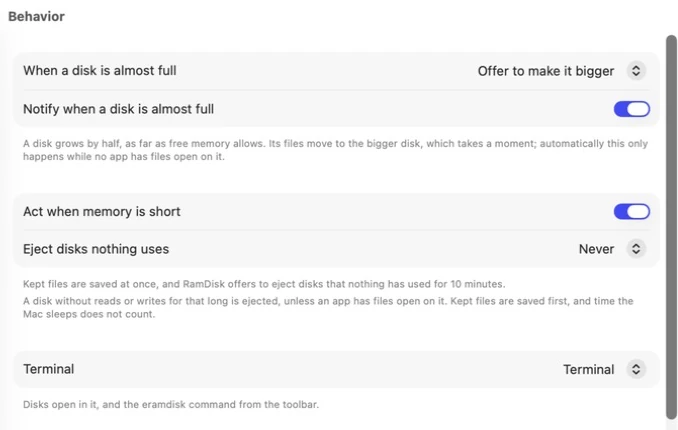
Exlade RamDisk watches this for you. The top of the window always says “Enough memory” or warns that it is running low. On Windows you get a notification when a disk is 90% full (click it to resize) and when less than 8% of memory is free. On a Mac the app can act on its own: save kept files and offer to eject disks nobody has used for 10 minutes, or enlarge full disks without asking. See Memory and History.
Find the right size in one day
Temp, Browsers and npm make a 2 GB disk, Developer and Xcode an 8 GB one. How to create it: on Windows and on a Mac.
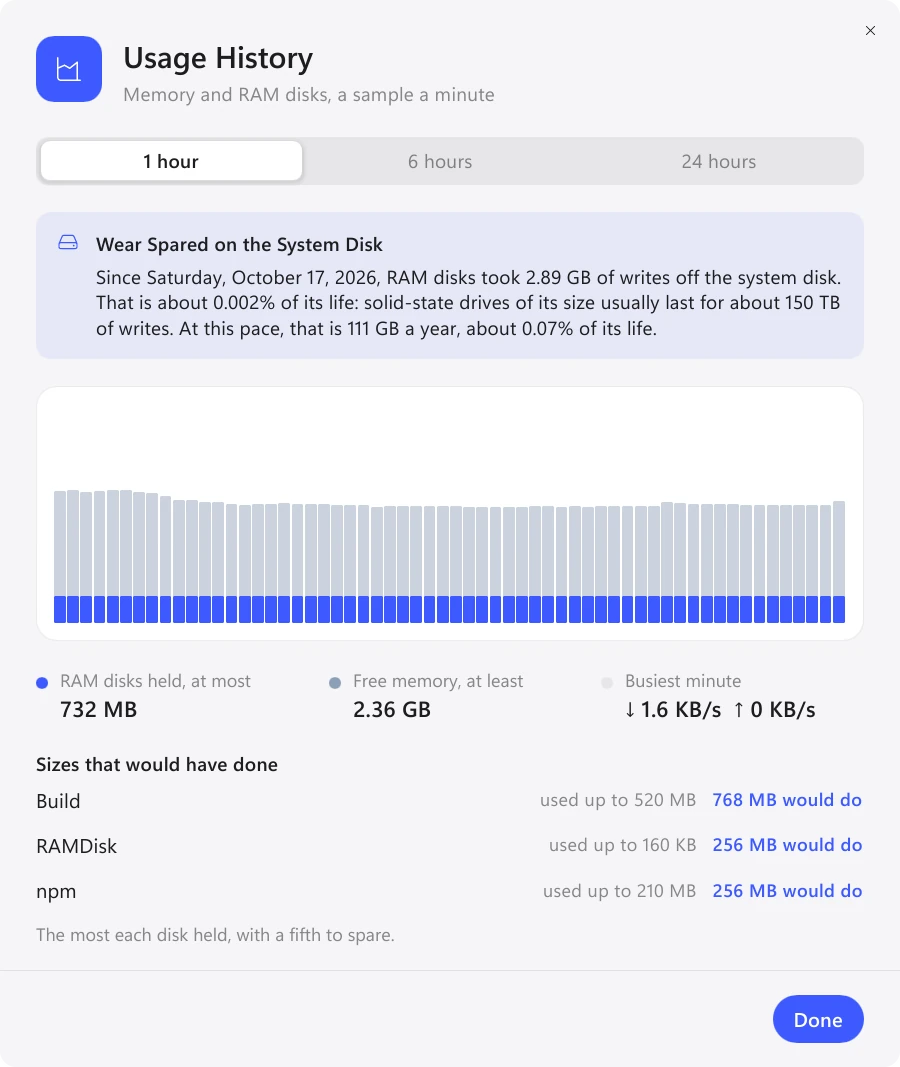
Builds, browsing, installs: the history records memory every minute.
Under "Sizes that would have done" you see the most each disk held, plus a fifth to spare. Resize the disk to that. On a Mac, on Linux and with NTFS on Windows the files stay in place; an exFAT or FAT32 disk on Windows is created again.
RAM disk vs SSD: what about wear?
Every SSD has a write endurance, usually given as TBW (terabytes written): the total amount of data the maker promises the drive can take. You find it in the drive’s spec sheet, and warranties often end at a number of years or at the TBW, whichever comes first. Larger drives usually get a higher TBW.
For an office PC the limit is far off anyway. It matters on build machines and CI servers, on small drives and in laptops whose SSD is soldered to the board. There a RAM disk takes the constant churn of caches and builds off the drive.
The top of the Usage History shows how much writing the RAM disks took off the system disk and what share of its endurance that is. Read it as an upper estimate: Windows doesn’t rush to write temporary files to disk, so some of them would never have reached the SSD.
Need the files after a restart? A startup disk with "Keep files" saves them on a schedule, before sleep and shutdown. After a sudden power loss you only lose what changed since the last save.
FAQ
Is a RAM disk faster than an NVMe SSD?
Yes, memory is faster than any SSD. You notice it most with many small files: builds, package installs, caches. With large files that are only read, the file cache and a good SSD already do most of the work.
Is a RAM disk worth it for gaming?
Usually not. A game takes dozens of gigabytes, has to be copied to memory every time and mostly reads its files. That memory is better left to the game itself.
Does an 8 GB RAM disk use 8 GB of RAM right away?
No. Only files written to the disk take memory. The exception is macOS 15, where a disk reserves its full size right away. The size is the most the disk can grow to.
Which RAM disk program should I use?
Exlade RamDisk is free for Windows, macOS and Linux. For other options, see our ImDisk alternatives comparison and the release post.
Windows 10 and 11, macOS 15 and later, Ubuntu, Debian and Fedora. No registration and no trial period.
Free Download Features