
A freelancer leaves a laptop on a train. On it: client contracts, invoices with names and addresses, a CRM export. Under the GDPR that’s a personal data breach. A short internal record, or a report to the authority plus a letter to every client? That depends largely on one question: was the data encrypted?
- The GDPR names no product, but lists encryption as an example of appropriate security.
- Encrypted, switched off, strong password, backup: usually only an internal record.
- Unencrypted: notifying the authority within 72 hours, often the clients too, is likely.
- Encrypt the system drive, client files, USB sticks and backups; document it.
This article is general information, not legal advice. For your specific situation, ask a data protection lawyer or your data protection officer.
What the GDPR says about encryption
No specific product, but three articles that matter for laptops:
In its Guidelines 01/2021 on examples of breach notification, the European Data Protection Board compares two thefts. Encrypted tablets, switched off, strong password, backup: internal documentation only. An unencrypted notebook with data of more than 100,000 customers: both notifications. Against lost devices, it recommends device encryption such as BitLocker or VeraCrypt.
When encryption actually helps
Lost laptop: typical scenarios
- System drive and client files encrypted, strong password, backup exists
- Document the breach internally; notifying the authority is usually not necessary
- Not encrypted: notifying the authority within 72 hours, and often the clients, is likely
- Encrypted, but stolen in sleep mode or unlocked: the drive was open, so treat it as unencrypted
- Unencrypted USB stick with a client export: same as an unencrypted laptop
The final assessment is yours (and your lawyer’s), but the gap between the columns is huge.
Checklist: encrypting work laptops and drives
C: holds Windows, temp files, the browser cache and email. Encrypt it fully: BitLocker on Windows Pro, Enterprise and Education, Device encryption on Windows Home with compatible hardware, otherwise VeraCrypt (free, open source).
See Windows 11 Home without BitLocker and encryption software for Windows.
Once Windows runs, C: is open to anyone at your desk and to any program. Keep client data in a separate encrypted place with its own password.
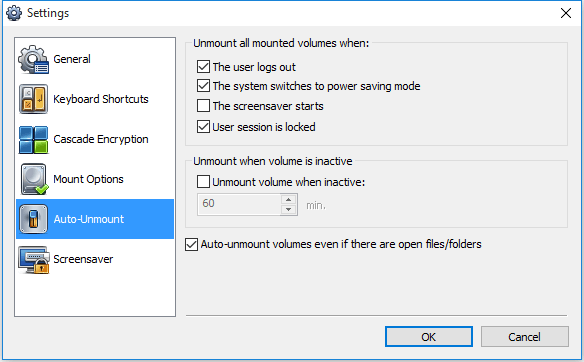
Cryptic Disk encrypts a data partition or a container file that mounts as its own drive letter, and unmounts it automatically on session lock, sleep or inactivity. One container per client or project is possible.
Same protection as the laptop: encrypt the whole drive or keep a container on it (guides for USB flash drives and backup drives). Windows Home has no BitLocker To Go; Cryptic Disk works on every edition.
Disk Password Protection asks for a password before Windows starts: useful when the system drive unlocks automatically via the TPM.
- Passphrases of several random words, at least 15 characters if the password is the only protection (how long should a password be).
- Different passwords for Windows, the container and online services.
- Screen lock after a few minutes; Win + L whenever you step away.
A forgotten password without a key backup means lost data, and lost availability is a GDPR issue too. Keep BitLocker recovery keys and Cryptic Disk header backups away from the laptop, where the business (not only the employee) controls them, also after the employee leaves.
You must be able to show compliance. A simple table is enough: device, user, system drive encryption, where client data and recovery keys are, last check. If a laptop is lost, you know within minutes whether it was encrypted.
Honest limits: Cryptic Disk can't encrypt the system partition: it complements BitLocker or Device encryption. Its header backup is protected by the password valid when you saved it, so it helps after a password change, not when the only password is forgotten. Disk Password Protection does not encrypt data and doesn't stop anyone from removing the drive or booting from USB: an extra barrier only.
The same applies to an office server or NAS, usually with their own encryption features; this guide covers laptops and portable drives.
When a laptop is lost or stolen
If notification is required, the 72 hours run from the moment you became aware of the breach.
- Write down when, where, which device, who noticed.
- Check your records: encrypted? switched off? which data?
- Block access: change email, cloud and business passwords, end all sessions, revoke the device's access.
- Locate or wipe the device if Find my device or a management tool was set up.
- Assess the risk and notify if required.
- Document the breach in any case: facts, effects, what you did.
- Restore the data from the backup.
Cryptic Disk for teams
Each person who uses it needs a license. One-time payment with a year of updates and support; packs from 5 to 100 users with volume discounts. On the road, see laptop security travel tips and how to protect your laptop and data.
FAQ
Does the GDPR require laptop encryption?
No tool is mandatory, but security must fit the risk, and encryption is the listed example. The EDPB recommends it for devices with personal data; without it, a lost laptop often leads to notifications.
Do I have to report a lost encrypted laptop?
Often not, if the encryption is strong, the key wasn’t compromised and a backup exists. Document it internally anyway. If the laptop was unlocked or asleep, the encryption doesn’t count.
Does the GDPR apply to freelancers?
Yes, if you process personal data of clients, their customers or employees for your business. Only purely personal or household activity is excluded.
Is BitLocker enough?
For the main scenario, a switched-off laptop lost or stolen, yes. A separate container protects client files while Windows runs; USB sticks and backups need their own encryption.
Is a boot password the same as encryption?
No. Disk Password Protection stops Windows from starting, but the data stays unencrypted and can be read in another computer. Use it in addition to encryption.